
-
 Geographical Reports for QuickBooks ®
Map your customer activities from QuickBooks ® for a bird's eye view of your business's past and present geographic footprint. -
 Build Your Own Spatial Reports
Assemble, run and revisit your custom report lineup without overnight synchs, coding or the privacy risks of web-based applications. -
 Innovative, Affordable & User-Friendly
Uncover location-specific trends and patterns with built-in drilldown reports, map playback and other innovative features available only with MapApp.


Overview

|
MapAppBy Data-Devil Technologies Geographical Reporting for QuickBooks® Users |
See where your business is happening with MapApp, a user-friendly spatial analysis solution built exclusively for use with QuickBooks ®.
- Keep tabs on product movements and customer activities anywhere in the United States.
- Spot and investigate patterns faster with innovative features like playback and drilldown.
- Assemble, run and rerun an unlimited number of customized spatial reports.
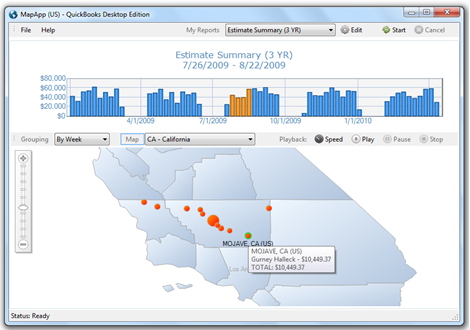
MapApp reads customer information and activities from QuickBooks ® into interactive, geographic reports. Specifically designed for fast spatial analysis, MapApp is ideal for measuring and investigating your business's geographic footprint over time.
MapApp lets you decide what to analyze and automatically stores the reports you create for future use. Reports always reflect up-to-date QuickBooks ® data and feature a variety of innovative analysis aids such as drilldown summaries, on-the-fly filtering and map playback.
Features
|
|
MapAppBy Data-Devil Technologies Geographical Reporting for QuickBooks® Users |
- Auto-Saved Custom Reports
- Interactive Graphical Displays
- Maps for Every State (US)
- Automated Geocoding
- Variable Speed Report Playback
- Intelligible Summaries and Drilldown Reports
- Real-Time Record Filtering
- Rapid, Read-Only QuickBooks ® Queries
- Export Support for Maps, Graphs and Data
- No Company File Count Restrictions
Quick Specs
|
|
MapAppBy Data-Devil Technologies Geographical Reporting for QuickBooks® Users |
| Current Version: | 2.01 |
| Created On: | December 27th, 2010 |
| Last Update: | December 1st, 2011 |
| Price: | $89.00 (USD) |
| Platform: | QuickBooks ® Pro, Premier, Enterprise 2003+ |
| Operating System: | Windows (PC) |
System Requirements
|
|
MapAppBy Data-Devil Technologies Geographical Reporting for QuickBooks® Users |
| QuickBooks ® Version |
Pro, Premier or Enterprise 2003+
UK / Canada Editions 2008+ |
| Operating System |
Microsoft Windows XP
Microsoft Windows Vista Microsoft Windows 7 Microsoft Windows Server 2003 Microsoft Windows Server 2008 (32 and 64 bit configurations OK) |
| Display |
800 x 600 (Minimum)
1024 x 768 (Recommended) |
| Memory | 512 MB (Minimum) |
| Hard Disk Space | < 50 MB |
| Internet Connection | Required for installation, geocoding and registration |
Download (Free Evaluation)
|
|
MapAppBy Data-Devil Technologies Geographical Reporting for QuickBooks® Users |
MapApp installs in minutes and includes a straightforward walkthrough which will help you connect with QuickBooks ® and begin building spatial reports.
There's no limit to how long you can evaluate MapApp, but reports run during evaluation omit a percentage of detail. You can later unlock full detail for your reports by purchasing a a user's license.
To get started, click the Download button below. Once complete, unzip the downloaded folder and run Setup.
Purchase (Only $89 USD)
|
|
MapAppBy Data-Devil Technologies Geographical Reporting for QuickBooks® Users |
To purchase a user's license for MapApp, just click the checkout button below. Following your secure payment, you will receive a purchase confirmation and a License Key by email. Enter your License Key when you start MapApp to unlock full functionality.
- No contracts
- No recurring fees
- No license expiration
- No privacy compromise
- No charge for updates or support
Money Back Guarantee: If you are for any reason unsatisfied with your purchase, let us know within 30 days for a full refund.
Promo CodeUpdates
|
|
MapAppBy Data-Devil Technologies Geographical Reporting for QuickBooks® Users |
Existing Users: To update versions simply download the latest release, run Setup and enter your license key when prompted. Your custom report list will not be overwritten when installing the updated version.
Version 2.01 (December 01 2011)Updated components and interfaces. Replaced census-derived state maps with a more flexible geocoding overlay. Added base maps for each state, DC and contiguous US. Improved report filtering capabilities.
Version 1.05Fixed connection bug specific to QuickBooks ® releases 2006 and earlier. Removed Company File path specification; now connects to currently open Company File.
Version 1.04Fixed installation bug specific to VirtualBox and Parallels deployment.
Version 1.03Fixed installation bug specific to Windows 7 (64 bit).
Version 1.02Updated to latest QuickBooks ® Foundation Class (10.0).
Version 1.01 (December 27 2010)Initial release.
